On 1 October, card surcharging ended in Australia. If your business used to add a card fee, ServiceM8 has already switched it off. But the old wording is probably still sitting in places ServiceM8 does not touch, and your customers will notice it before you do.
What changed on 1 October
From 1 October 2026, businesses can no longer add a surcharge when a customer pays by eftpos, Mastercard or Visa. That covers debit and credit cards. The detail is in the Reserve Bank's conclusions and its FAQ.
Amex, Diners, PayPal and buy now pay later sit outside the ban, so those are a separate question.
If you run ServiceM8, it switched card surcharging off for Australian businesses automatically on the same day, as announced at the ServiceM8 15 launch. So the payment screen is sorted. The problem is everything else that still says there is a fee.
Where the old wording hides
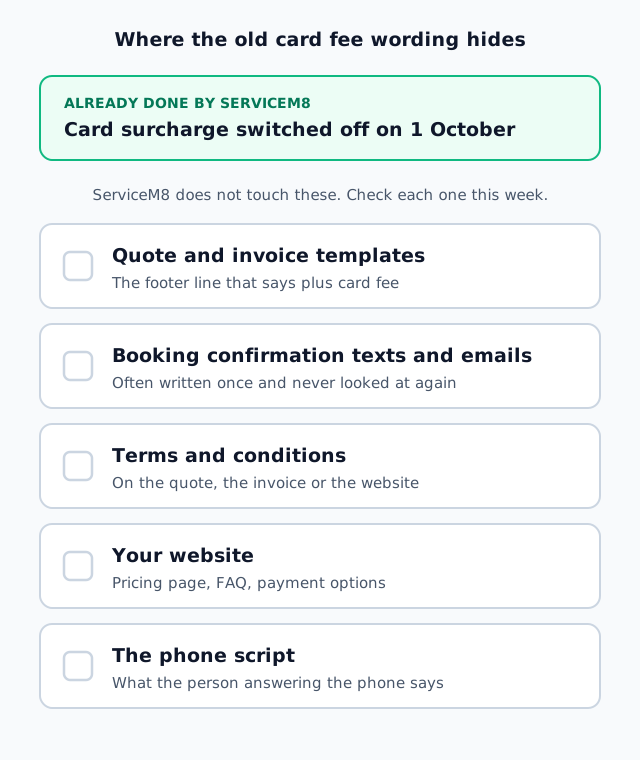
The old line about a card fee lives in more places than you would think:
- Quote and invoice templates. The footer line that says "plus card fee".
- Booking confirmation texts and emails. Often written once and never looked at again.
- Terms and conditions. On the quote, the invoice or the website.
- Your website. The pricing page, the FAQ, the payment options section.
- The phone script. Whatever the person answering the phone has been saying for years.
ServiceM8 does not touch any of those. So a customer can read "plus card fee" on the quote, then pay by card and see no fee at all. Or someone in the office tells them about a fee you cannot charge any more. Go through each one this week and take the line out.
Absorb the fee, or lift your prices
Losing the surcharge means somebody pays the card fee. You have two choices: absorb it, or lift your prices.
If your margins are thin, absorbing it on every job adds up across a year. If you decide to lift prices, ServiceM8 has a price change wizard that lifts your item prices by a set percentage across the board, so you are not editing items one at a time.
Either way, make it a decision. Do not let the fee quietly come out of your margin because nobody got around to it.
Send big jobs to bank transfer
Big jobs are where the card fee really hurts. ServiceM8 has a new setting that hides card payment on invoices above an amount you choose. Over that amount, the customer pays by bank transfer instead.
That keeps the card fee off your largest invoices, and smaller jobs can still be paid on the spot. Pick a number that suits your work, and set it once.
Tell your regulars first
If you have lifted prices, or you are steering bigger jobs to bank transfer, a short message to your regulars goes a long way. Say the card surcharge has gone because the rules changed on 1 October, and say what is different now.
A customer who hears it from you first takes it as good news. A customer who spots a change on the invoice starts asking questions.
This week
- Find every card fee line: templates, texts and emails, terms, website, phone script.
- Decide who pays the fee: absorb it, or lift prices with the price change wizard.
- Set the amount above which invoices go to bank transfer.
- Send your regular customers a short message.